Create and publish
Quickly create an agent skill and publish it to agentregistry.
About publishing skills
Agentregistry serves as a catalog for your AI artifacts, including agents, skills, and MCP servers. To control which images you want to make available to your teams, you can use the publishing capability in agentregistry. If an image is published, a reference to its container image location is stored in agentregistry. This allows teams to quickly discover approved skills and pull them from the registry.
Before you can publish an image reference, you must first build the image. Agentregistry provides the following options for building your skill images:
- Build the image locally. This option assumes that you want to build the skill image on your local machine only, such as for local test setups. The image is not pushed to your container registry. While you can still create a catalog entry for the skill image in agentregistry by using the
arctl skill publishcommand, you cannot deploy the image to a Kubernetes cluster, unless you manually load the image to your cluster. - Build and push: This process allows you to build the skill image on your local machine and push it to your container registry. Note that this option requires you to be logged into the container registry that you want to use.
For testing purposes, the instructions in this guide assume that you do not want to use agentregistry to push the image to your container registry.
Create the skill
-
Create a scaffold for an
myskillClaude skill. The following command creates amyskilldirectory that includes ahello-world.pyscript that generates a greeting output based on the input parameters that you provide.arctl skill init myskill -
Explore the skill scaffold that was created for you. You can optionally make changes to the files to customize your skill further.
ls myskillExample output:
assets Dockerfile LICENSE.txt references scripts SKILL.mdFile Description assetsDirectory containing static assets such as images, files, or other resources used by the skill. DockerfileThe Dockerfile to spin up and run your skill in a containerized environment. LICENSE.txtLicense file containing the license information for your skill. referencesDirectory containing reference documentation, links, or additional resources related to the skill. scriptsDirectory containing helper scripts for building, testing, or running the skill. SKILL.mdThe skill definition file with YAML frontmatter that describes the skill, its capabilities, and metadata. This file is required for publishing the skill to agentregistry.
Publish the skill
-
Publish the skill to agentregistry. The following command builds and tags the skill image as
docker.io/user/hello-world-template:latestand creates a catalog entry for the skill in agentregistry. The catalog entry assumes that the image is located in thedocker.io/userimage registry. Note thatdocker.io/useris a dummy container registry address that is used for testing purposes.arctl skill publish myskill --docker-url docker.io/userExample output:
Found 1 skill(s) to publish
Processing skill: /Users/myuser/Downloads/myskill
Building Docker image (Dockerfile via stdin): docker build -t docker.io/user/hello-world-template:latest -f - /Users/myuser/Downloads/myskill
[+] Building 0.2s (5/5) FINISHED                                                                                                                                                                                              docker:desktop-linux
 => [internal] load build definition from Dockerfile                                                                                                                                                                                          0.0s
 => => transferring dockerfile: 59B                                                                                                                                                                                                           0.0s
 => [internal] load .dockerignore                                                                                                                                                                                                             0.0s
 => => transferring context: 2B                                                                                                                                                                                                               0.0s
 => [internal] load build context                                                                                                                                                                                                             0.0s
 => => transferring context: 51.86kB                                                                                                                                                                                                          0.0s
 => [1/1] COPY . .                                                                                                                                                                                                                            0.0s
 => exporting to image
...
✓ Skill publishing complete!
To also use agentregistry to push the image to your container registry, include the--pushoption and set the--docker-urlto your container registry address. You can also set the platform, for which you want to build the image, such aslinux/amd64by using the--platformoption. For more information, see the arctl skill publish command. Make sure that you are logged in to your container registry before you run the command. -
List the skill image references in agentregistry. Verify that you see an entry for the
hello-world-templateimage reference that you just published.arctl skill listExample output:
NAME TITLE VERSION CATEGORY PUBLISHED WEBSITE hello-world-template latest <none> True -
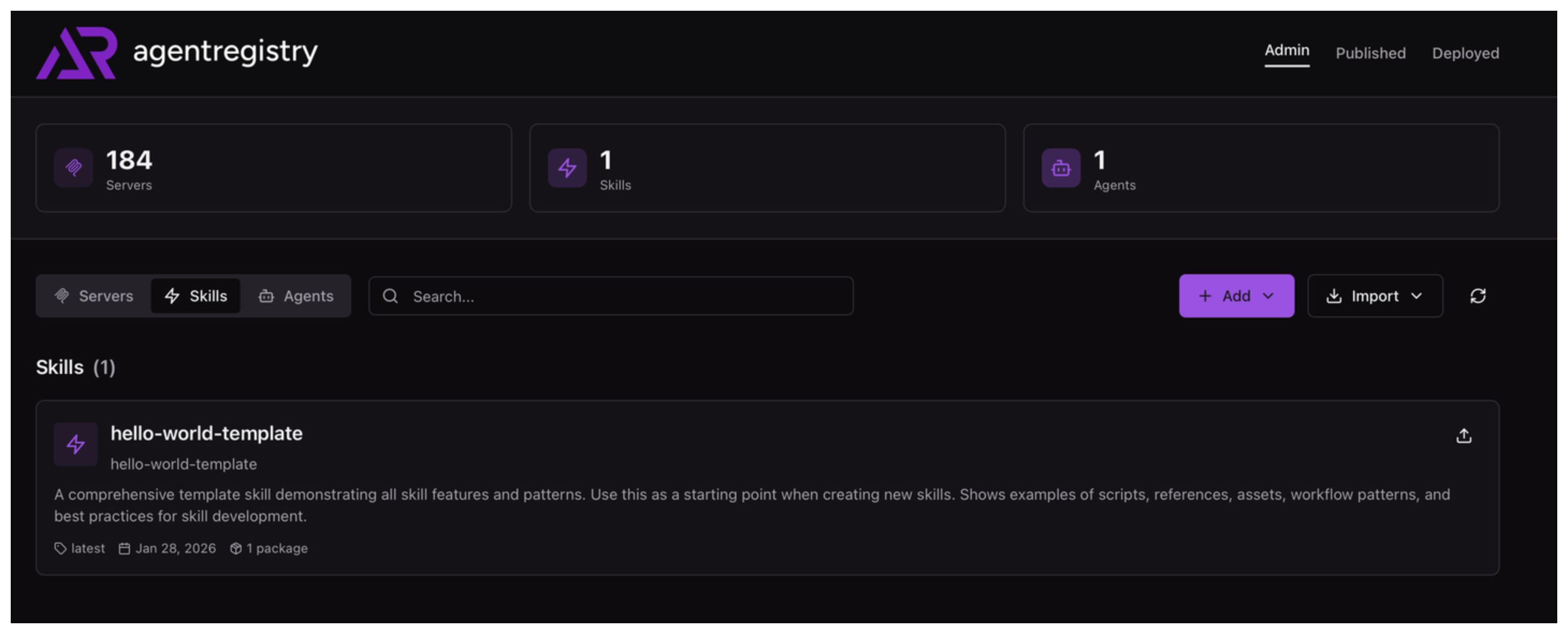
Optional: Open the agentregistry UI and go to the Skills view. Verify that you can see your agent image reference.
Cleanup
To unpublish a skill image from agentregistry, use the arctl skill unpublish command.
arctl skill unpublish hello-world-template --version latest